
Robocod1.0.3 - Google Play
You'll be able to see results in few seconds.
Publisher Description
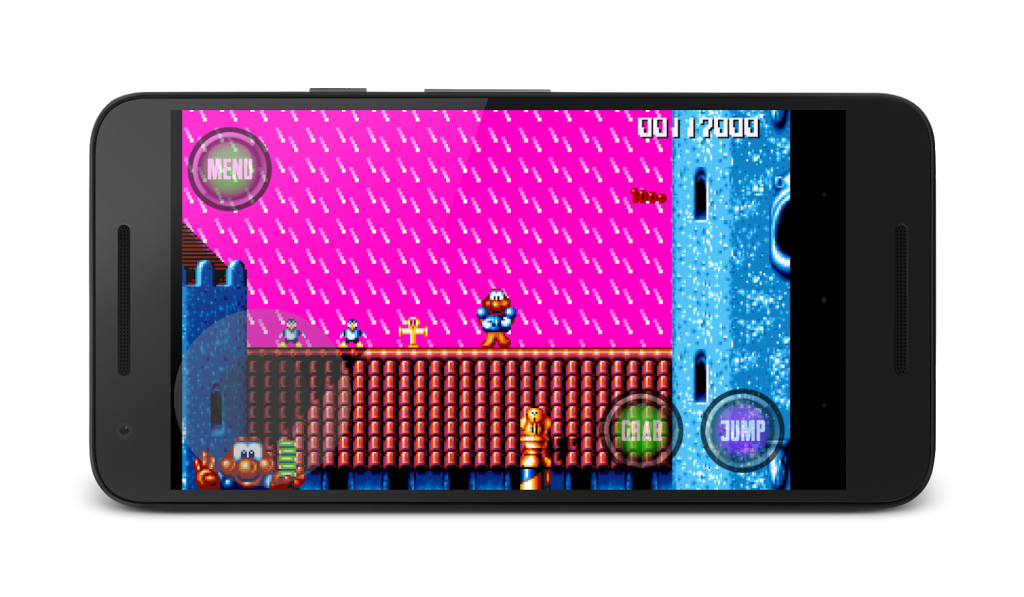
There’s nothing quite like a run and jump game, and this game’s an all-time great. How can you not like a hero called Robocod?! With a face like a frog and an almost infinite ability to stretch, he’s the ultimate James Pond superhero.
The premise of the game is this: Dr Maybe has taken over Santa’s workshop at the North Pole and has kidnapped all the penguins. You, as James Pond’s superhero, codenamed Robocod, must free the penguins. But beware, Dr Maybe has some assistants in the shape of evil toys. Mwahahaha I hear you say – or perhaps not…..
Now this game would have required a keyboard and the pressing of direction keys or letters. But no more. Thanks to Mirror Games, we’ve completely reengineered this game so it will work easily on your smartphone. There are simple direction keys and action buttons to follow. We’ve included some instruction keys for you to follow but it really is incredibly easy to play. So download, play and tell your friends.
This game really benefits from having all the clever game controls, so we’ve made a small charge. Go on, it’s worth it! Please do make sure you ask the permission of the bill payer before committing to download the game.
The game is available to Android users only, but don’t worry you fans of iPhones, a version for you and your tablet will be along very soon.
Keep coming back to Mirror Games, over the next weeks and months we’ll be bringing you a raft of new and old games for your enjoyment, be that over a cuppa, on your way to school or work, or with your feet up on the sofa.
About Robocod
The company that develops Robocod is Funfui Ltd. The latest version released by its developer is 1.0.3.
To install Robocod on your Android device, just click the green Continue To App button above to start the installation process. The app is listed on our website since 2016-02-02 and was downloaded 0 times. We have already checked if the download link is safe, however for your own protection we recommend that you scan the downloaded app with your antivirus. Your antivirus may detect the Robocod as malware as malware if the download link to com.funfui.robocod is broken.
How to install Robocod on your Android device:
- Click on the Continue To App button on our website. This will redirect you to Google Play.
- Once the Robocod is shown in the Google Play listing of your Android device, you can start its download and installation. Tap on the Install button located below the search bar and to the right of the app icon.
- A pop-up window with the permissions required by Robocod will be shown. Click on Accept to continue the process.
- Robocod will be downloaded onto your device, displaying a progress. Once the download completes, the installation will start and you'll get a notification after the installation is finished.
Program Details
System requirements
Download information
Pricing
Version History
version 1.0.3
posted on 2016-02-02
Disclaimer
Official Google Play Link
We do not host Robocod on our servers. We did not scan it for viruses, adware, spyware or other type of malware. This app is hosted by Google and passed their terms and conditions to be listed there. We recommend caution when installing it.
The Google Play link for Robocod is provided to you by apps112.com without any warranties, representations or guarantees of any kind, so access it at your own risk.
If you have questions regarding this particular app contact the publisher directly. For questions about the functionalities of apps112.com contact us.
